Skip to content

Research Management System for universities

Research Management. Reimagined.

One intelligent platform to manage research grants, funding, approvals, incentives, and institutional research operations.

RMS helps universities manage the whole research lifecycle, from application to approval to reporting, through one centralized platform.

Already deployed at Dhofar University, Sultanate of Oman.

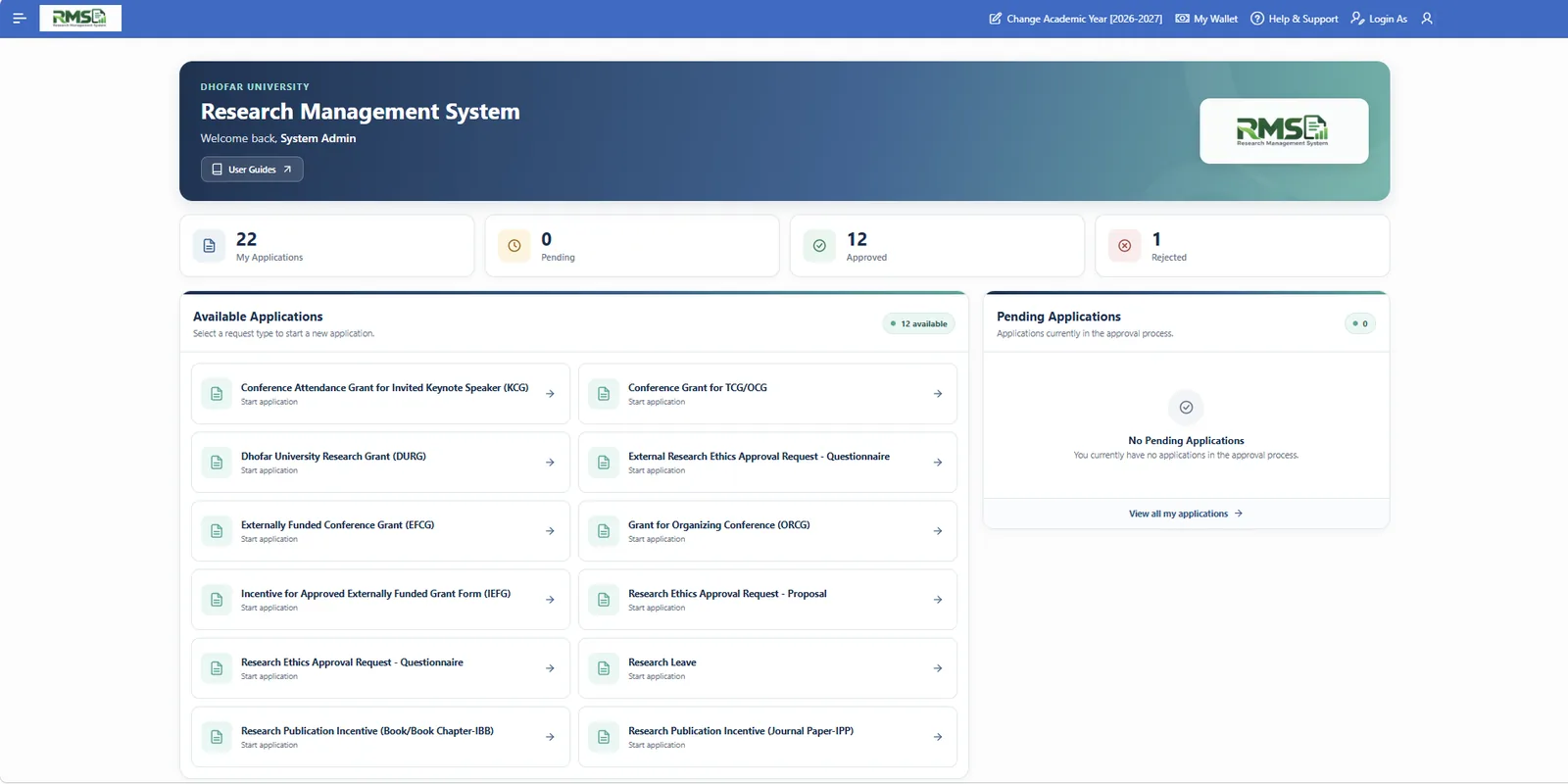
RMS faculty home screen showing application types and application status counts
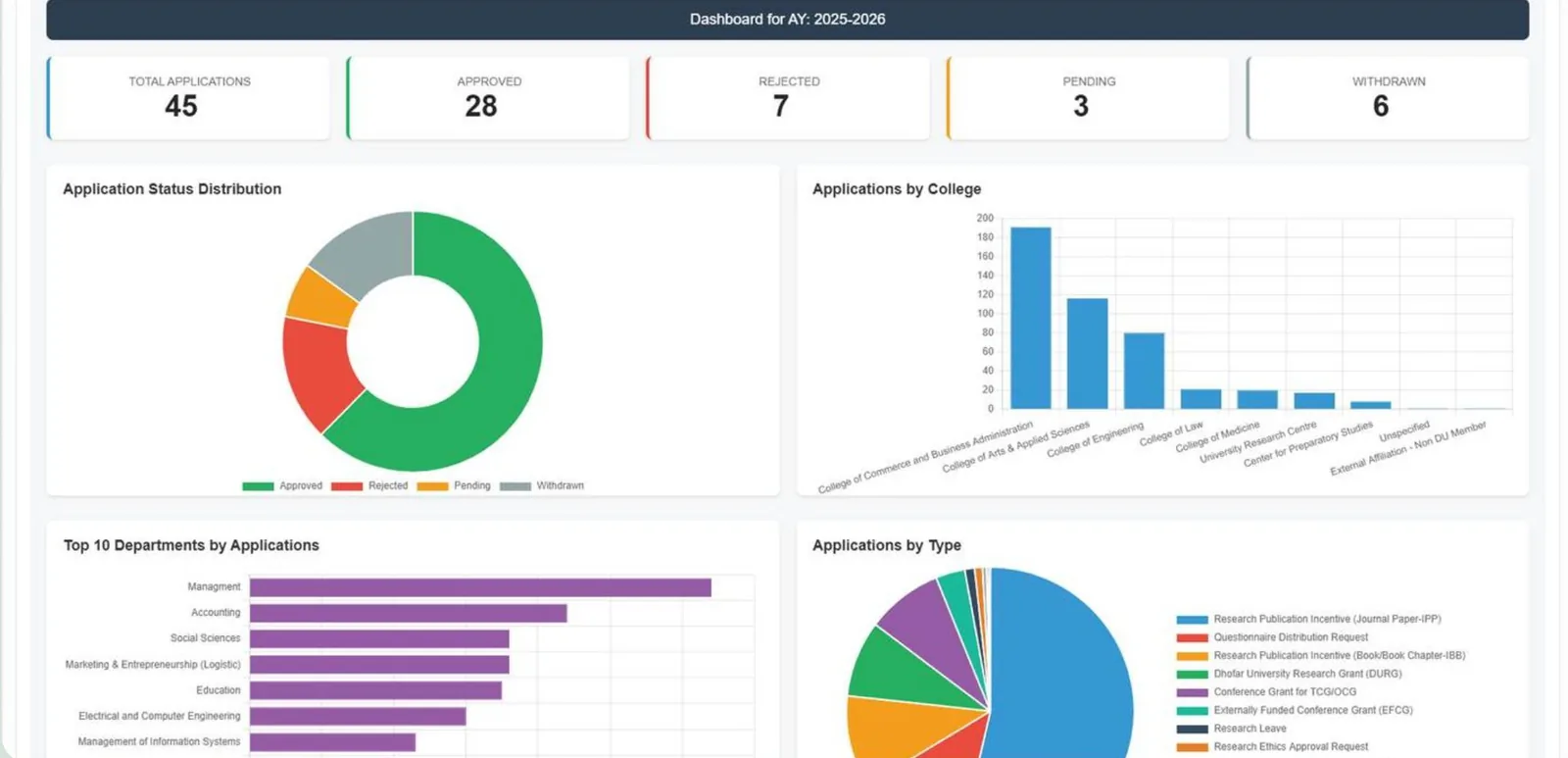
RMS institutional dashboard with status and department charts
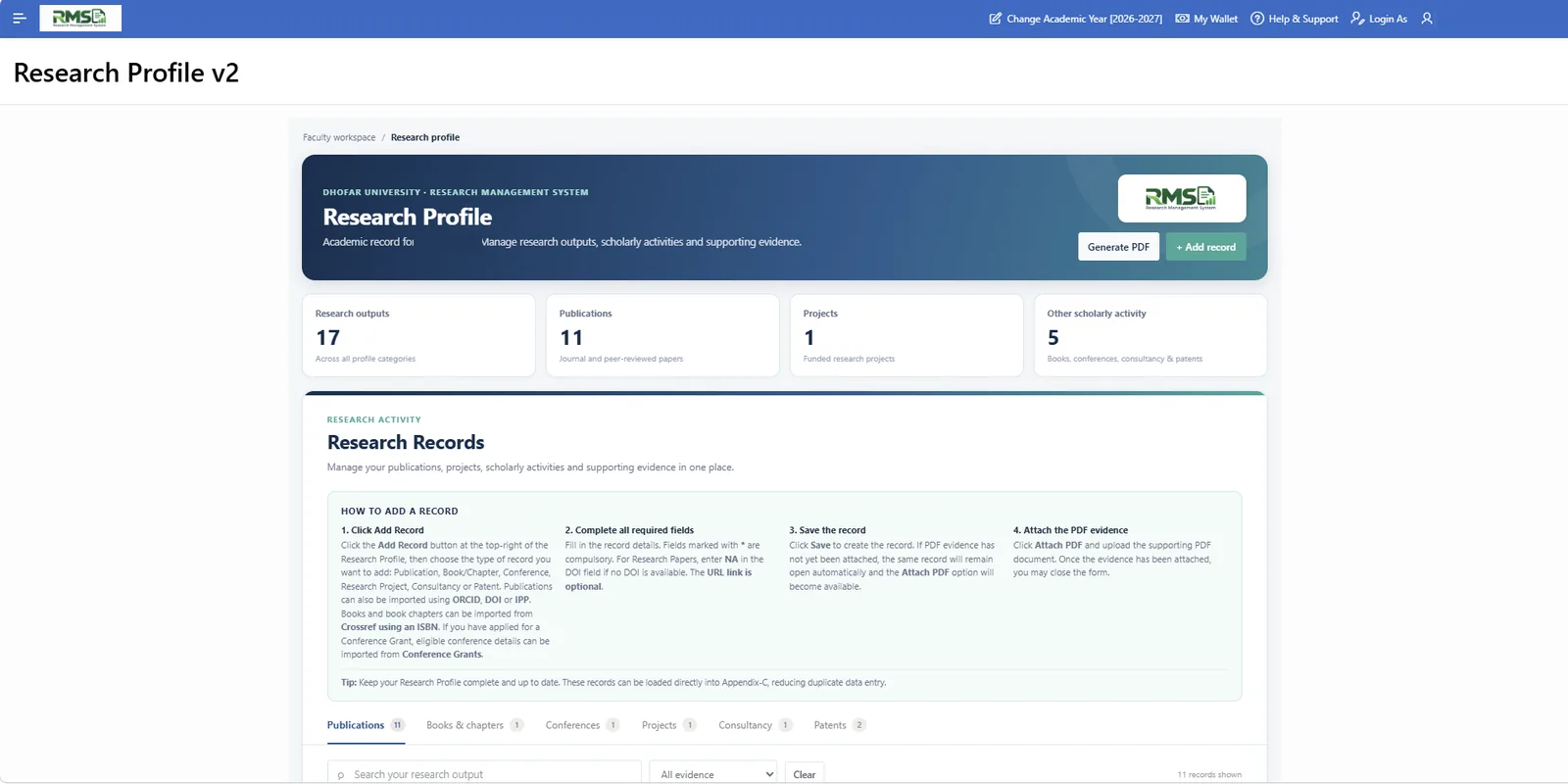
RMS research profile with record counts
  • What it isAn enterprise Research Management System
  • Who it is forUniversities and research institutions
  • Is it real?Operational at Dhofar University, Oman
  • How to buyOne-time licence or hosted subscription

The problem

Research administration is complex. Managing it shouldn't be.

  • Disconnected spreadsheets and email

    Requests, attachments and decisions are scattered across inboxes and files.

  • Manual approval processes

    Forms move from desk to desk and it is hard to know where a request is.

  • Fragmented funding information

    Grant, incentive and budget information lives in separate places.

  • Difficult procurement tracking

    Purchases, hiring and salary requests are hard to tie back to the grant that funds them.

  • Limited visibility

    Leaders cannot easily see what research activity is happening or how requests are progressing.

  • Time-consuming reporting

    Institutional reports are assembled by hand from many sources.

Before RMS

Disconnected workflows

Spreadsheets Email threads Paper forms Standalone systems Research office

With RMS

One connected research administration platform

Researchers Reviewers Finance Leadership RMS

The RMS platform

Everything your research office needs. One platform.

RMS connects every stage of research administration on shared data. Select a capability to see it in detail.

Modules

Choose the modules your institution needs.

Each module covers a real research administration process. Screens shown are from the live deployment at Dhofar University, with personal details redacted.

Research Grants

Administer internal and external research grants from application to approval, with budgets and grant-related requests handled in the same record.

Who uses it
Researchers and faculty, the research office, finance teams.
Practical benefit
Every grant has one connected record, so funding decisions and requests are no longer scattered across emails and spreadsheets.
  • Internal and external grant applications
  • Project approvals through configurable stages
  • Budget tracking linked to each grant
  • Purchase, hiring and salary requests tied to the grant
RMS home screen listing available application types, with the Dhofar University Research Grant highlighted
Application catalogue at Dhofar University. The grant application type is highlighted.

Research Incentives

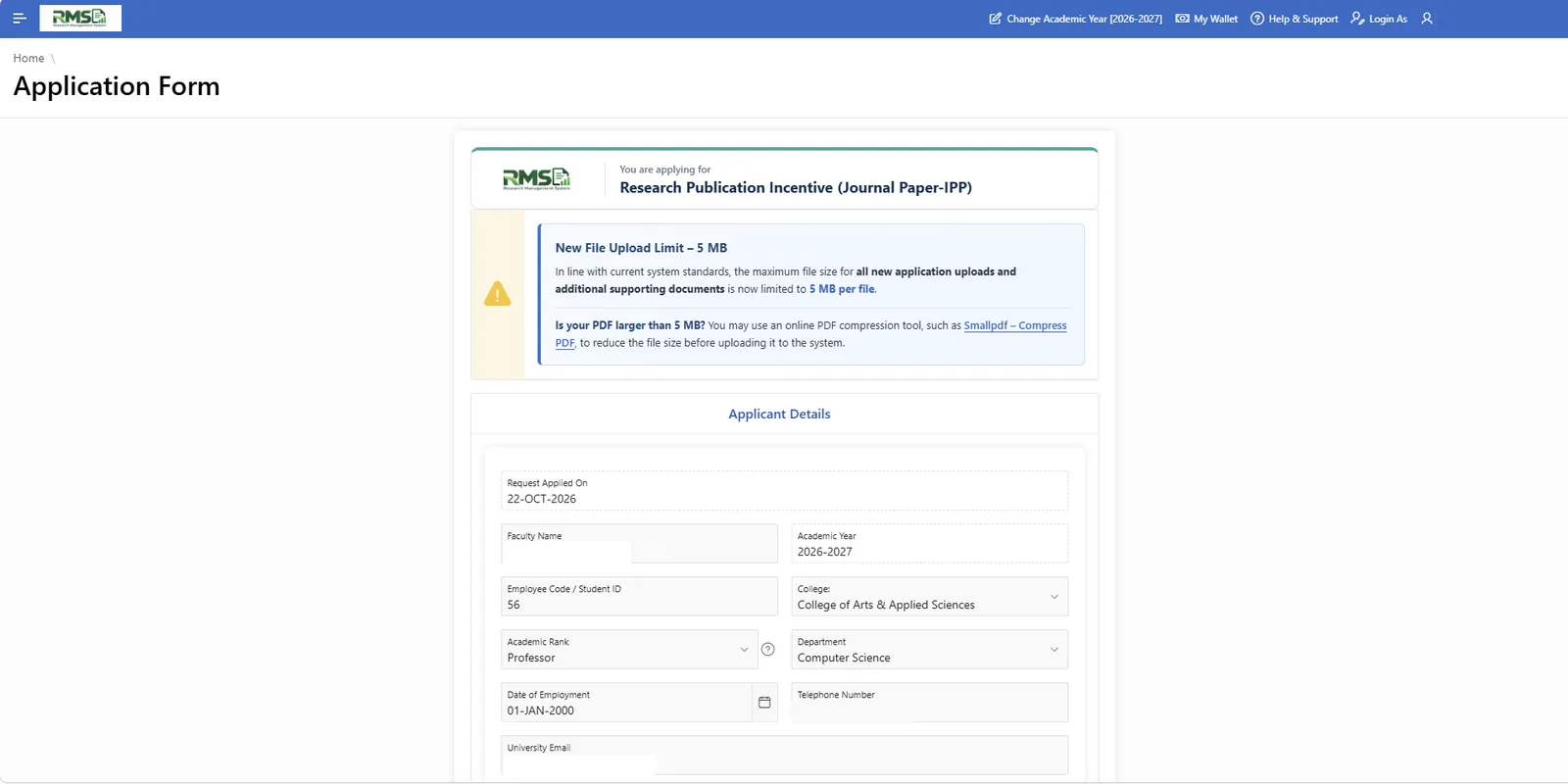
Faculty submit publication and book incentive applications online. Eligibility review and approvals follow a defined workflow.

Who uses it
Faculty applicants, research office reviewers, approvers.
Practical benefit
Applicants see the status of their claim, and reviewers work from the same structured submission instead of emailed files.
  • Journal paper and book or chapter incentives
  • Structured submission forms with supporting evidence
  • Eligibility review and approval tracking
  • Publication details can be filled from ORCID or DOI records
RMS application form for a research publication incentive with applicant details
Online incentive application form. Applicant details are redacted.

Conference Grants

Manage conference funding applications, review them, and record administrative decisions in one flow.

Who uses it
Faculty applicants, committees, the research office.
Practical benefit
Conference requests are reviewed and decided consistently, with a visible history for applicant and administrator.
  • Separate application types for different conference situations
  • Review by the responsible committee or office
  • Decisions and comments recorded on the application
  • Conference details can be imported into the research profile
RMS home screen with the conference grant application types highlighted
Conference grant application types at Dhofar University are highlighted.

Research Leave

Faculty request research leave online, and the request moves through the institution's approval workflow.

Who uses it
Faculty, department heads and deans, the research office.
Practical benefit
Leave requests follow the same approval path every time and can be tracked by everyone involved.
  • Online research leave application
  • Approval at each configured stage
  • Status visible to applicant and approvers
RMS home screen with the Research Leave application highlighted
The Research Leave application is highlighted in the application catalogue.

Ethics and Committee Review

Submit ethics applications, assign reviewers, route them to committee review and record institutional decisions.

Who uses it
Researchers, reviewers and committee members, the research office.
Practical benefit
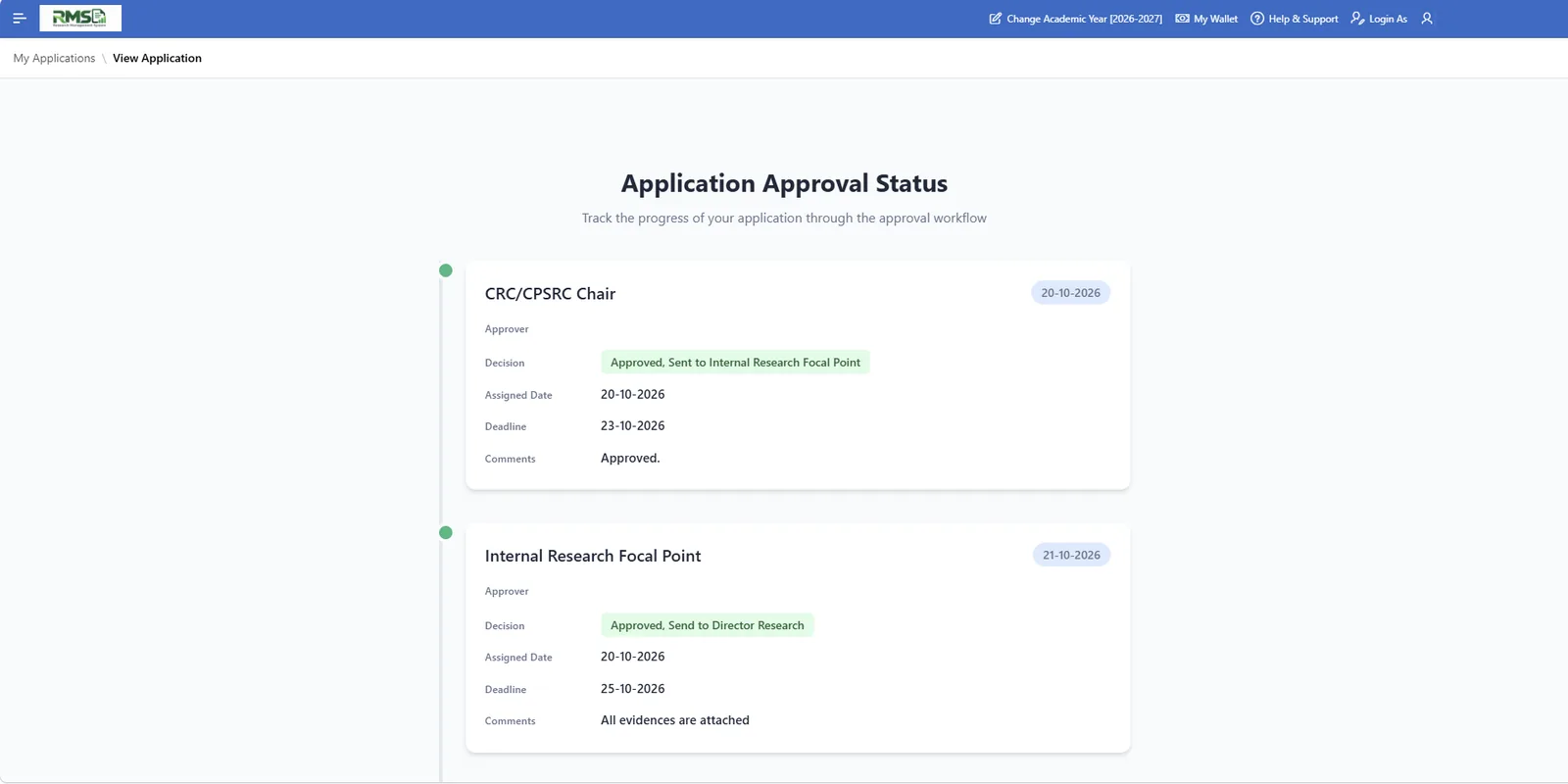
Reviews and decisions are recorded against the application, with a clear trail of who decided what and when.
  • Ethics approval requests for proposals and questionnaires
  • Reviewer and committee assignment
  • Comments and decisions with dates
  • Approval trail visible to the applicant
RMS approval status timeline showing committee decisions, dates and comments
Approval status timeline: each stage shows decision, dates and comments. Approver names are redacted.

Procurement and Financial Requests

Route purchase requests, research assistant hiring requests and salary requests for approval, linked to the grant that funds them.

Who uses it
Principal investigators, finance and procurement teams, the research office.
Practical benefit
Spending requests are approved online and stay connected to the grant budget.
  • Purchase requests for equipment, materials and services
  • Research assistant hiring requests
  • Research assistant salary requests
  • Approval before cost is charged to the grant

Screens for this module are shown in a live demonstration.

We do not publish these screens because they contain institutional financial data.

Request a Demo

Research Profiles

Researchers keep publications, projects and scholarly activity in one profile, with evidence attached, and can import records using ORCID or a DOI.

Who uses it
Researchers and faculty, the research office, leadership.
Practical benefit
Records are entered once and reused for incentives, scoring sheets and reports, reducing duplicate data entry.
  • Publications, books and chapters, conferences, projects, consultancy and patents
  • Import from ORCID, DOI or ISBN
  • Evidence attachments per record
  • PDF export of the profile
RMS research profile showing counts of research outputs, publications, projects and records by category
Research profile with record categories and evidence status. Researcher name is redacted.

Institutional Dashboards and Reporting

See application volumes, status and approvals across the institution, broken down by college, department and application type.

Who uses it
University leadership, deans, the research office, finance.
Practical benefit
Decision-makers get a live view of research administration without compiling reports by hand.
  • Application status distribution
  • Breakdown by college, department and type
  • Dashboards for different leadership roles
  • Academic-year filtering
RMS institutional dashboard with application status chart and breakdowns by college and department
Institutional dashboard view. Figures are shown as they appeared in the source environment and are not performance claims.

How RMS works

From application to report, in one connected flow.

Example: a research grant application, seen by the researcher and by the research office.

The researcher

A faculty member picks the grant application type, completes the online form and attaches the supporting documents.

The research office

The application arrives in the office queue already structured, with the applicant's details and evidence attached.

The researcher

They can see who the application is with and what each reviewer has recorded.

The research office

Reviewers and committees are assigned. Each records an evaluation or comment against the application.

The researcher

The decision and any comments appear in the application's approval timeline.

The research office

Approvers act at each configured stage, such as chair, focal point or director, and every decision is dated.

The researcher

An approved grant becomes a managed record; follow-on purchase, hiring and salary requests are raised against it.

The research office

Budgets and linked requests are tracked per grant, and finance sees the same record.

The researcher

Their profile and application history stay up to date for incentives and evaluations.

The research office

Dashboards and reports are produced from the same shared data, with no re-keying.

Approval stages, approvers and routing are configured to match your institution's requirements.

Who uses RMS

One platform. Every stakeholder connected.

  • Researchers and Faculty

    Apply online, track every request, and keep a research profile that can be reused across applications.

  • Research Office Administrators

    Run grants, incentives, leave and ethics from one system with consistent workflows and a complete record.

  • Department Heads and Deans

    Approve requests online and see activity across their college or department.

  • Reviewers and Committees

    Receive assigned applications, record evaluations and decisions, and leave a clear trail.

  • Finance and Procurement Teams

    See approved requests and grant budgets on the same record the research office uses.

  • University Leadership

    Follow research administration through live dashboards rather than compiled reports.

Product showcase

See RMS in Action.

Real screens from the live deployment. Names, contact details and identifiers have been removed.

Real-world deployment

Built for real institutional needs. Proven in practice.

Institutional deployment

Dhofar University

Sultanate of Oman

RMS was developed and implemented at Dhofar University, where it is operational and supports institutional research administration.

  • Supports operational institutional research workflows
  • Brings multiple research administration processes into one system
  • Evolved through practical requirements and day-to-day feedback

Dhofar University is named as the institution where RMS is deployed. This does not imply an endorsement.

  1. Institutional needsRequirements from a working research office
  2. Design and developmentModules built around real workflows
  3. Live implementationIn use for operational processes
  4. Continuous refinementImproved through day-to-day feedback

Why choose RMS

Less chasing. More visibility. Research administration that works the way you do.

  • 01

    Integrated research administration

    Grants, incentives, leave, ethics and financial requests share one platform and one set of data, instead of one tool per process.

  • 02

    Modular by design

    Choose the modules your institution needs and add others as your requirements grow.

  • 03

    Configurable workflows

    Approval stages, approvers and routing are set up around how your institution already works.

  • 04

    One source of truth

    Applicants, reviewers, finance and leadership all see the same live record, not copies.

  • 05

    Approval tracking

    Every application shows where it is, who decided, and when.

  • 06

    Institutional visibility

    Dashboards turn day-to-day administration into an overview leaders can act on.

  • 07

    Oracle-based technology

    Built on Oracle APEX and Oracle Database, a platform many IT teams already know.

  • 08

    Flexible deployment

    Run it on your own infrastructure, or have it hosted for you on a subscription.

Enterprise technology

Built on Oracle. Designed for institutional operations.

In plain terms: your people use RMS in a web browser, and it keeps every record in an Oracle database.

Your peopleResearchers, reviewers, finance, leadership. Any web browser.
RMS on Oracle APEX
  • Role-based permissions
  • Workflow automation
  • Audit trails
Oracle DatabaseSecure record storage
Your other systemsConnected through REST services, such as a finance system. Scope agreed per institution.
  • Oracle APEX

    The application layer. RMS is a browser-based application built with Oracle APEX.

  • Oracle Database

    Research records, approvals and documents are stored in an Oracle Database.

  • Browser-based access

    Users open RMS in a web browser. There is nothing to install on their computers.

  • Role-based permissions

    What each person can see and do depends on their role.

  • Workflow automation

    Applications move through the configured approval stages automatically, from submission to final decision.

  • Audit trails

    Approval decisions are recorded with dates so activity can be reviewed afterwards.

  • Integration capabilities

    RMS can exchange data with other institutional systems through REST services. At Dhofar University it is linked with the university finance system.

Hosting, security and compliance arrangements are defined for each implementation.

Deployment and licensing

Flexible licensing. Built around your institution.

Option A

One-Time Licensing

Your Infrastructure. Your Control.

  • One-time software licensing payment
  • Deployed on the institution's own hosting infrastructure
  • Select the modules your institution requires
  • Pricing depends on selected modules and implementation scope
  • Optional ongoing maintenance and support arrangements
Request a Quote

Option B

Hosted Subscription

RMS Hosted. Simple to Manage.

  • Subscription-based pricing
  • Hosting included and managed by the RMS provider
  • Select modules according to institutional requirements
  • Maintenance and technical support terms defined in the subscription agreement
  • Suitable for institutions that prefer a managed hosting solution
Request Subscription Pricing
Comparison of RMS deployment options
CompareOne-time licenceHosted subscription
Payment modelOne-time licensing paymentSubscription
Hosting responsibilityYour institution's infrastructureHosted and managed by the RMS provider
Module selectionSelect the modules you needSelect the modules you need
Maintenance arrangementsOptional maintenance and support arrangementsDefined in the subscription agreement
Best-fit customerInstitutions that want to control their own infrastructureInstitutions that prefer a managed hosting solution

Final scope, pricing and terms are set out in the licence or subscription agreement.

Implementation journey

A simple path from first conversation to go-live.

Implementation is adapted to your institution's requirements. Timelines are agreed with you once the scope is clear.

  1. 1

    Discovery and Requirements

    We learn how your research office works today and what you need to improve.

  2. 2

    Module Selection

    You choose the modules that fit your institution.

  3. 3

    Configuration and Deployment

    Workflows, roles and forms are configured and RMS is deployed in your chosen model.

  4. 4

    Training and Go-Live

    Your teams are trained and RMS goes live for real requests.

  5. 5

    Support and Continuous Improvement

    Support and improvements continue under the arrangement you choose.

FAQs

Frequently asked questions

What is RMS?

RMS is a Research Management System for universities and research institutions. It brings research grants, incentives, conference funding, research leave, ethics review, procurement requests, research profiles and reporting into one platform.

Which institutions can use RMS?

RMS is designed for universities, higher education institutions, research organizations and research administration departments.

Is RMS already operational?

Yes. RMS was developed and implemented at Dhofar University in the Sultanate of Oman, where it supports institutional research administration.

Can we choose only the modules we need?

Yes. RMS is modular. You select the modules your institution requires, and the scope is agreed during implementation planning.

Can RMS be hosted on our own infrastructure?

Yes. With one-time licensing, RMS is deployed on your institution's own hosting infrastructure.

Is a hosted subscription available?

Yes. In the hosted option, RMS is hosted and managed by the RMS provider under a subscription agreement.

Does RMS support configurable approval workflows?

Yes. Approval stages and routing are configured around institutional requirements. The exact configuration is agreed during implementation.

Can RMS integrate with existing university systems?

RMS supports integration through REST services. Which systems are connected, for example finance or identity systems, is scoped for each institution.

Is training available?

Training is part of the implementation journey. The scope and format are agreed with your institution.

How is pricing calculated?

Pricing depends on the modules you select, the implementation scope and the deployment model. Request a quote for licensing or subscription pricing.

Can we request a demonstration?

Yes. Use the form on this page to request a demonstration tailored to your institution.

What technology is RMS built on?

RMS is built on Oracle APEX and Oracle Database and is accessed through a web browser.

Get started

Ready to Transform Research Management?

Discover how RMS can help your institution streamline research administration and manage its research activities through one connected platform.

Interested modules